Always ready to record
ExplainItOnce includes a built-in screen recorder as a Chrome extension. No extra license, no setup, always there when you need it. While you record, it smooths your cursor in real time, slowing it down so the unconscious mouse jiggery-pokery never makes it into the output. It captures only the content area. Upload to ExplainItOnce, and it handles the rest: clean background, new voice, documentation.
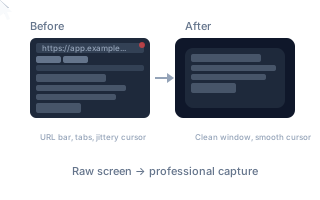
Watch anyone do a screen recording. Even people who do it regularly. The mouse is everywhere. Hovering over things that don't matter, drifting to the side, circling aimlessly while they talk. Nobody does this on purpose. It's unconscious. But the viewer sees every twitch, and it makes the recording look amateur before the explanation even starts.
The ExplainItOnce screen recorder fixes this while you record. It smooths your cursor in real time, enlarging the pointer and slowing it down so you can't jitter even if you try. It forces deliberate movement without you having to think about it. The result looks like you planned every mouse action.
The recorder also captures only the content area of your screen. Your bookmark bar, your staging URLs, notification badges, your messy desktop: none of it is in the recording. That makes it easier for ExplainItOnce to do its job. When you upload the recording to the web app, ExplainItOnce strips any remaining clutter, places the content on a clean background, replaces the voice with a fluent narrator, tightens the script, syncs the timing, and generates written documentation. All automatically.
The extension on its own gives you a cleaner screen recording than any other tool would. But paired with ExplainItOnce, it's the starting point for a fully produced explanation.
It's a Chrome extension. Everyone in the organization has it the moment they need it. No license to manage, no separate tool to install, no resolution settings to figure out. The person who needs to explain something opens Chrome, clicks the extension, and starts talking.
5 free minutes. No credit card required.