All the visual clutter, gone
ExplainItOnce strips away every visual distraction: faces and meeting UI from video calls, bookmarks and desktop clutter from screen recordings. Only the content stays, on a beautiful background.
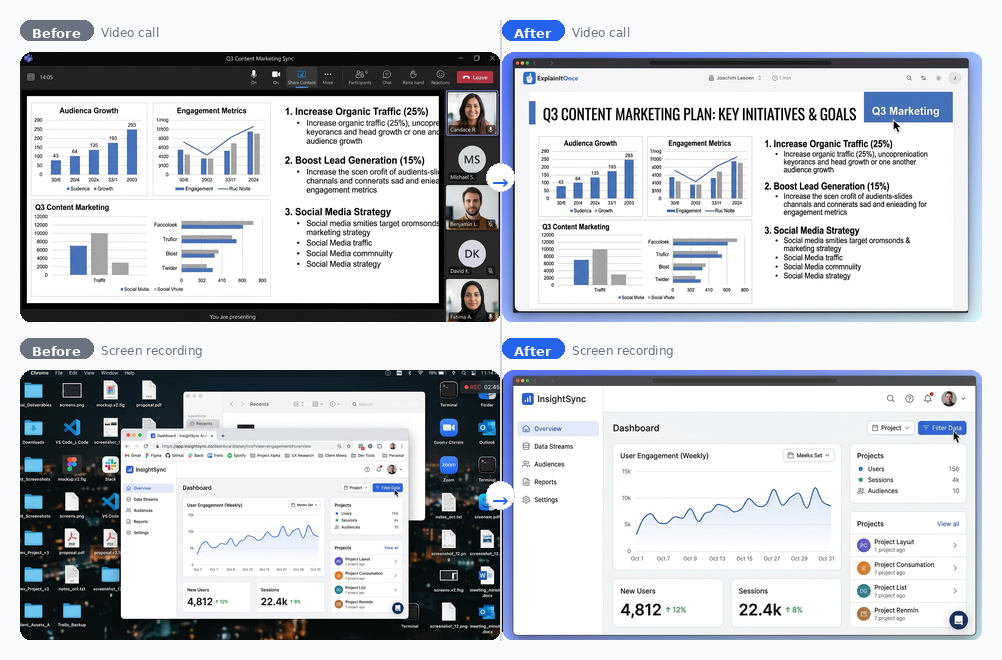
Upload a video call (a Microsoft Teams meeting, a Zoom call) and the recording shows your colleagues' faces, the meeting toolbar, the chat panel. The content being shared is just one section of the screen. ExplainItOnce pulls that section out and strips away the faces, the toolbar, and the chat.
Upload a screen recording and you might see bookmarks, a URL with a staging environment link, the taskbar, notification badges, or a messy desktop. ExplainItOnce pulls the content out of that too and discards everything that isn't the knowledge being shared.
Then it goes further. When the content was shown inside a web browser, it replaces the original browser chrome (with all its bookmarks, extensions, and URL bars) with a clean browser frame. Just enough visual context to say "this is a web application" without any of the distracting elements.
This works on everything you upload, regardless of where it came from or how it was recorded. It's not a feature of the screen recorder. It's what happens to every video.
5 free minutes. No credit card required.